Review labeled conversations
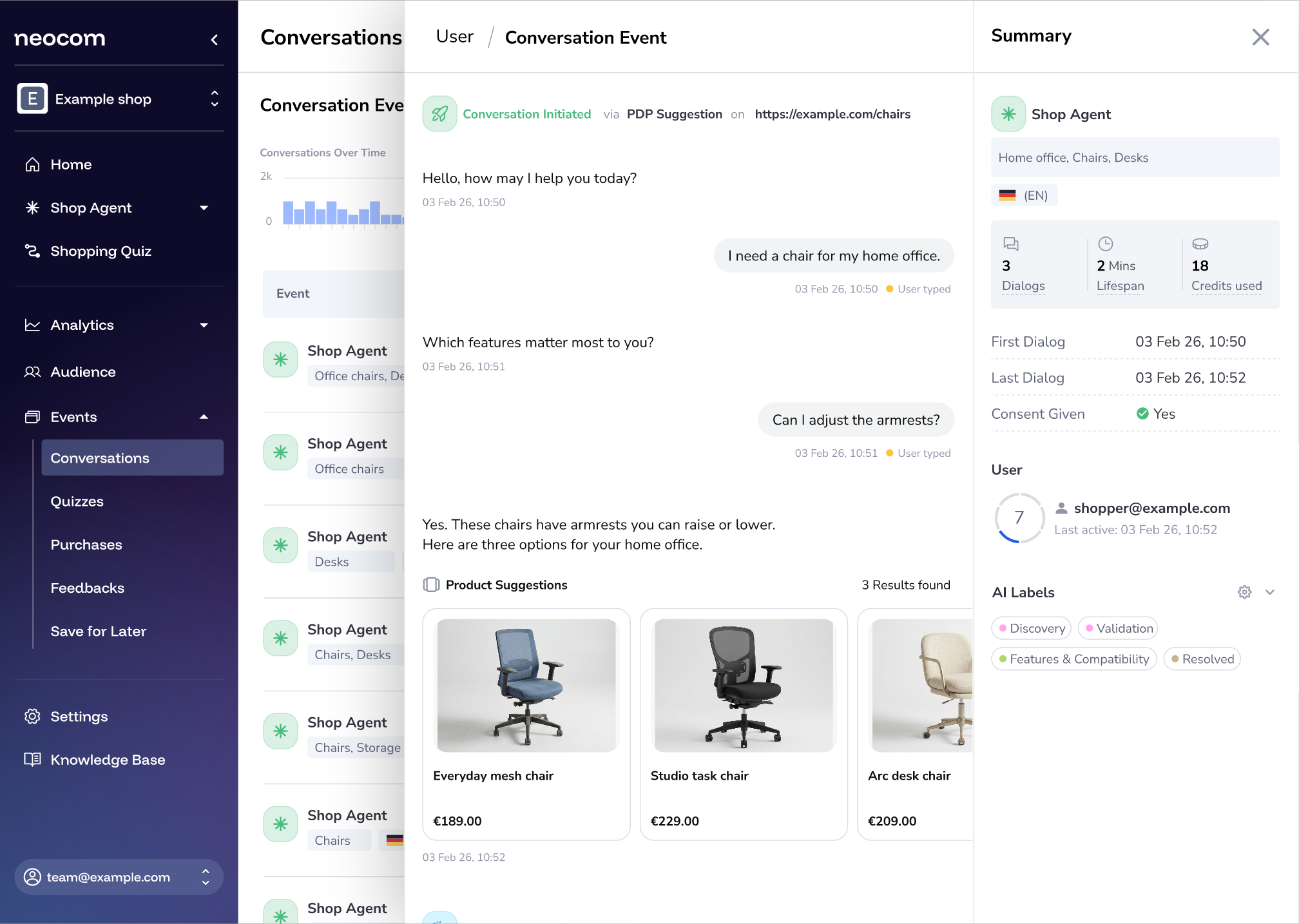
In Data Studio, you can read a conversation alongside its labels. Here, a shopper asks whether a chair’s armrests adjust. Look under Summary › AI Labels to see how Neocom labeled the exchange.

View the full-size conversation example
Read the overview
Section titled “Read the overview”Open Shop Agent › Analytics › Semantic to see what shoppers ask about and find conversations worth reading. The Semantic Analysis dashboard opens on the last 30 days. To compare periods, change Date range. To see conversations that started on a particular page, enter part of its address in Starting URL contains.
The Resolution rate is the share marked Resolved among conversations with a Resolution label. If a shopper leaves after the agent asks a question, that conversation often has no Resolution label. The rate can be high even when some shoppers leave with unanswered questions. See how Resolution works.
What does each dashboard chart count?
| On the Overview tab | What to look for |
|---|---|
| Conversations labeled | Counts conversations that show at least one label in the selected period. |
| Negative mood and Human requested | Each shows the share of scored conversations with that label. |
| Resolution rate and Outcome of rated conversations | Both use conversations with a Resolution label. The rate is the share marked Resolved. The outcome chart also shows the Partially Resolved and Unresolved shares. |
| User Journey by week, User Mood by week and Resolution by week | Compare how shoppers’ reasons for visiting, feelings and outcomes change over time. |
| Topics: volume and outcome | Find frequent topics and see which ones have unresolved requests, unhappy shoppers or requests for a person. |
| Resolution by topic | See the outcomes for each topic. |
| Topic × User Journey | For each topic, see the share of its conversations with each journey label. |
| Top 5 topics over time | See how the daily share changes for the five most frequent topics. The chart includes days with at least 20 scored conversations. |
Topics come from the product, pricing, order and returns categories.
Find conversations to review
Section titled “Find conversations to review”On the Conversations tab, use Conversations to review. The same list appears at the end of Overview. Use the Issue filter to choose which conversations to review.
| Issue | What to look for |
|---|---|
| Unresolved | Read the request and the reply. Look for a missing product detail, an incorrect answer or an item your shop does not carry. |
| Negative mood | Read the message where the shopper expressed frustration. |
| Human requested | Find the message where the shopper asked for a person. |
Each row shows when and where the conversation started and which labels it carries. Follow its link to read the exchange in Data Studio.
Read one conversation
Section titled “Read one conversation”In Data Studio, open Events › Conversations. Select a conversation. Read the transcript on the left. On the right, Summary › AI Labels sits below User.
Hover over a label to see its category. Select the arrow to group the labels by category. The gear opens label settings.

Troubleshoot missing labels
Section titled “Troubleshoot missing labels”Why does Summary show “No labels”?
Neocom scored the conversation. Either the scores fell below their thresholds or the labels that passed are switched off. Check which labels are active in label settings.
Why is the AI Labels section missing?
Check the chat consent status and how the shopper sent the message. For a recent conversation, allow at least three minutes for scoring. The section also disappears if the chat expires or the shopper later rejects chat consent.
Why is a category missing?
Data Studio only shows categories with a visible label. Check which labels are active. In a single-label category, switching off the model’s first choice leaves that category empty. See which scores become labels.
Why is there no Resolution label?
Check the agent’s last reply. If it ends with a question and the shopper leaves, Neocom usually leaves Resolution empty. The category can also be empty if its scores fall below a threshold or its chosen label is switched off. See how to read Resolution.